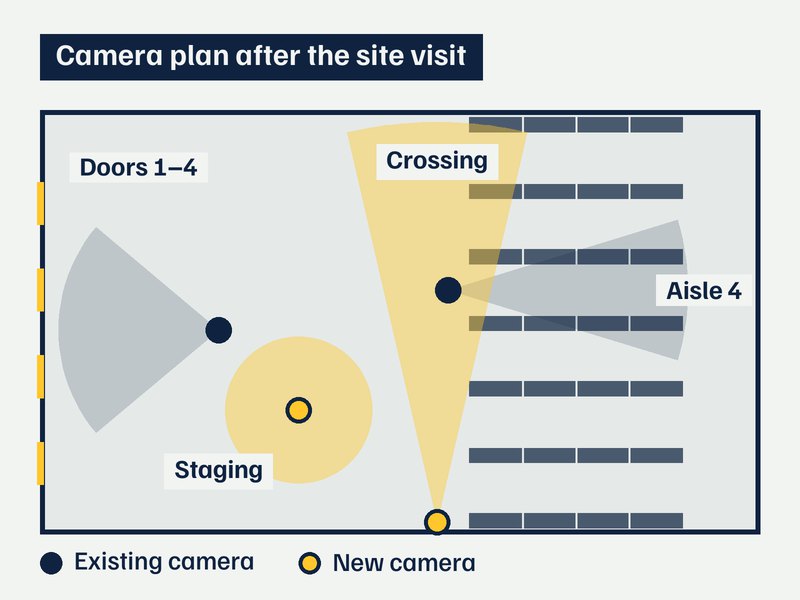
Tailored solutions
We come to your site, walk through the warehouse and listen to what you want to know. Then we build the solution around your questions, not around a product list.
LogiVeu puts the cameras in your warehouse to work: registering every pallet in and out, measuring loads while the forklift keeps moving, documenting damage at receiving and warning before forklifts and people collide. Every event goes straight into your WMS or TMS.
No two warehouses are alike, and neither should the solution be. We come to your site, see how you work and build what gives you exactly the answers you need.
We come to your site, walk through the warehouse and listen to what you want to know. Then we build the solution around your questions, not around a product list.
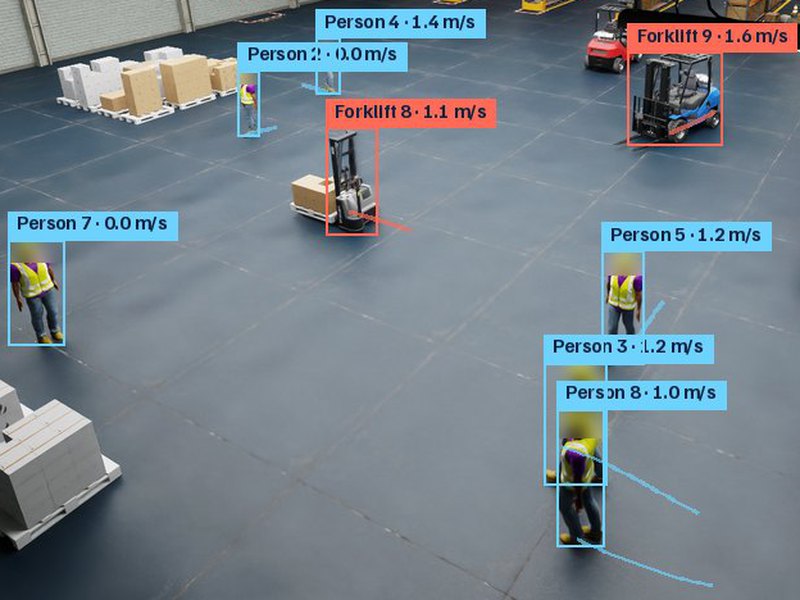
Every pallet in and out, where the goods are, how forklifts and people move, and the near misses before they become accidents. Around the clock, with nobody counting or writing it down.
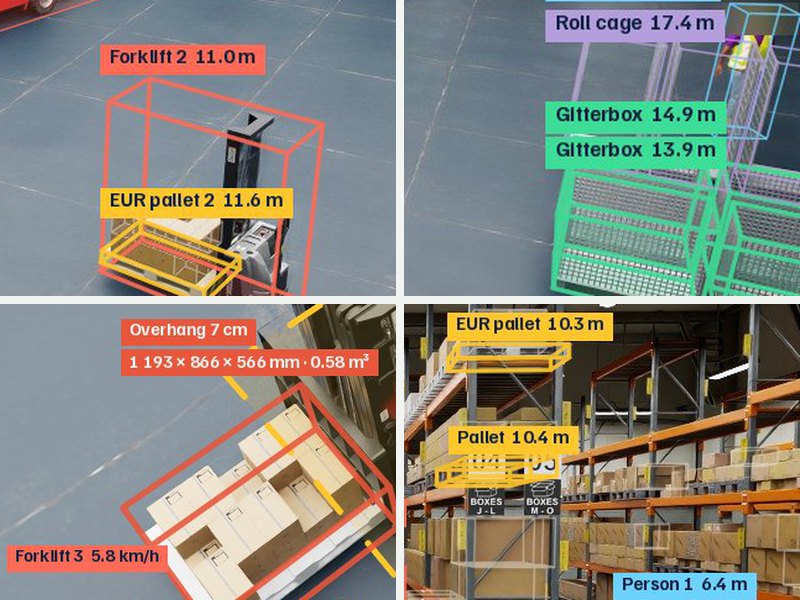
The system uses the cameras you already have and learns your load carriers, your lighting and your angles. The answers arrive where you already work: your WMS, a weekly report or an alert to the right person.
People in the picture are made anonymous straight away. The system knows that someone is walking in the aisle and how close the forklift gets, but never who it is.

Real CCTV footage. “The camera sees” is the camera image, with the faces blurred here on the page. “The system keeps” is what gets stored: forklifts and goods as they are, people as figures with a number.
The system recognises forklifts, pallets and people, but never who anyone is. No faces, no names and no link to access cards.
Faces and bodies are masked on your own computer before anything is stored or sent on. What leaves the warehouse is figures with a number.
The reports are about near misses, flows and risks, never about an individual employee's pace. That makes it easier to bring the safety representative and the union on board from the start.
It all belongs together. Planning decides what should happen, cameras show what actually happens, and automation removes the steps in between that nobody should have to do by hand. Measuring, safety and damage have their own sections further down.
Eyes on the warehouse around the clock, with no extra work.
We make the cameras you already have smarter. The system keeps track of pallets, goods and forklifts, estimates counts and volume, and documents deviations as goods arrive, automatically and with images as evidence.
For example
The system runs on a computer at your site and uses the cameras you already have. It finds pallets, parcels, forklifts and people, follows them through the frame and stores every event with an image and a timestamp, so you can show what happened when a claim comes in.
Cameras that see the dock or the aisle, and a place for the server. If cameras are missing, we help decide where they should go.
Third-party warehouses, terminals and operations with many inbound deliveries, including chilled and food.
No more pen, paper and guesswork.
Many steps in a warehouse are still done by hand. We help you automate them, from registration and reporting to the 3D understanding that self-driving forklifts and robots need. We train and test in a simulated copy of the warehouse before anything changes on the floor.
For example
We start with the manual steps that take the most time and connect cameras, planning and your systems (WMS, TMS, ERP) so that information moves by itself. For robots and self-driving forklifts we build the 3D perception and test it in simulation before it is used in the warehouse.
A walk-through of your routines and access to the systems involved.
Growing warehouses, operations preparing for automation and integrators that need cameras that understand what they see.
A camera above the door measures the length, width and height of every pallet while the forklift drives through. No stopping, no laser gate and no tape measure. The volume goes straight to your WMS or TMS, and loads that overhang or are too tall are flagged before they are put away.
Dock 3, zone A · created automatically
Example from the simulation alongside. How accurate it is at your site, we measure on your own pallets in the pilot.
The system follows the load through the measuring zone and combines measurements from many frames, so the forklift can drive at normal speed. Every pallet gets dimensions, volume, an image, a time and a door, and the same camera can also look for damage and read labels.
A camera that sees depth sits above the door or the driving lane and is set up once. It finds the pallet, separates the load from the forklift and works out the length, width and height. You set the limits: overhang, maximum height per rack slot and what counts as a deviation.
Measuring on the move is usually done with laser gates today, which are expensive to buy and install. A camera is cheaper and simpler to install, and the same image is also used for damage documentation and labels.
A spot above the door with power and network, and which pallets and rack slot heights you use.
Third-party warehouses, terminals and groupage, where volume drives price, space and loading.
Measured volume gives the right chargeable weight, a deviation when declared dimensions are wrong and better load planning, because planning knows what is actually on the dock and not only what the order said.
The dimensions are compared with the delivery note or waybill. If they do not match, a deviation is logged with an image and linked to the right sender.
Measured volume and height go to load planning, so the truck is loaded by real dimensions and loading metres are not guessed.
If the dimensions are to be the basis for invoicing, type-approved measuring equipment is usually required. We sort that out together with you before the pilot starts.
An ordinary security camera becomes a measuring instrument. Every person and forklift gets its own ID, a position on the floor plan and a speed, even when they hide each other. That is the basis for zone rules, warnings before a collision and analysis of how the flows really run.
20 s, one camera · generated automatically
The log writes itself. The camera is set up once, and from then on the same tracks feed zone rules, warnings and flow analysis.
Every person and forklift becomes a point on the floor plan. You see where they are, where they are heading and how fast they go.
In a warehouse something is always in the way. The system keeps hold of every person and forklift even when they are only half visible or walk behind a rack, so the counts and speeds come out right.
Most forklift accidents happen where nobody can see the other party: at rack ends, doors and crossings. The cameras see both. We warn before paths cross, and when something nearly happens, the system writes the report for you.
TR-0142 · created automatically
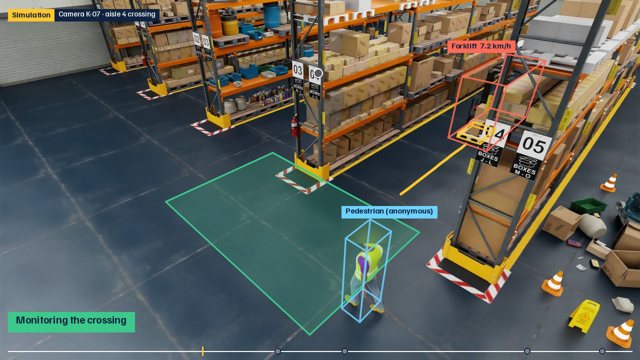
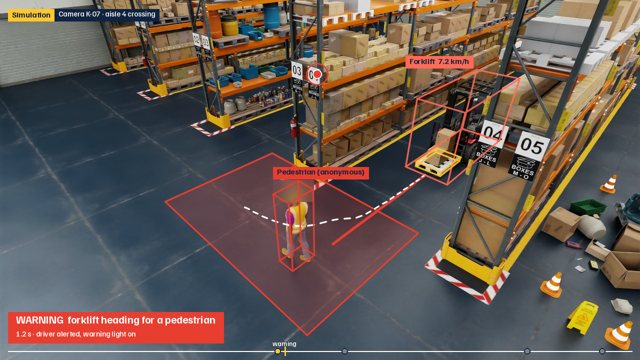
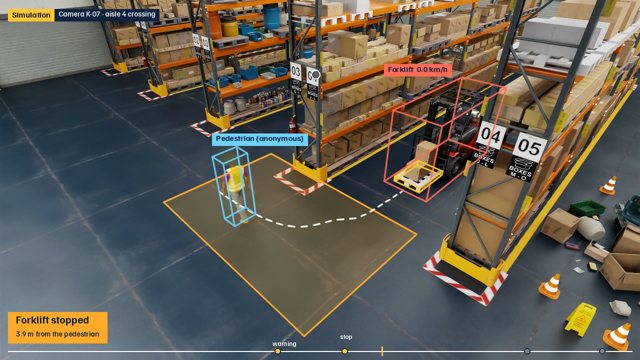
A counterbalance forklift carrying a EUR pallet was traveling at 7.2 km/h in aisle 4 when a warning activated 1.3 seconds before reaching the crossing zone. The forklift braked 0.3 seconds after the warning, stopping after 1.29 m of braking, with the closest distance to the pedestrian being 3.63 m. No contact or injury occurred.
Example from the simulation alongside. The fields fill in as the event happens, and the description and actions are a draft for the safety representative to review.
We follow forklifts and pedestrians in real time, work out where they are heading in the next few seconds and warn when paths cross: a light at the crossing, a signal in the cab or a lower speed. Everything runs on site, so the warning comes within a fraction of a second.
You draw the zones: rack ends, doors, crossings and walkways. When a pedestrian is in a zone and a forklift is predicted to reach it within a couple of seconds, the warning goes off. The same cameras also spot pedestrians off the walkway and forklifts going too fast.
People are detected but never identified, and faces are masked before anything is stored.
Every near miss becomes a finished report: time, place, who was involved, speeds and distances, images before and after, and a draft description and actions. The safety representative reviews and passes it on, instead of starting from a blank page.
Near misses are collected per zone and week, so you see where the risks really are and whether a measure helped. Reports export to your deviation system and serve as input if a serious incident has to be reported to the authorities.
Cameras that see the crossings and a place for the server. We help you place the zones.
A camera at the door looks at every pallet and parcel as it comes in. Broken boards, crushed corners and tears are marked, photographed and logged as a deviation before the goods are put away. Then you know who should pay for the damage.
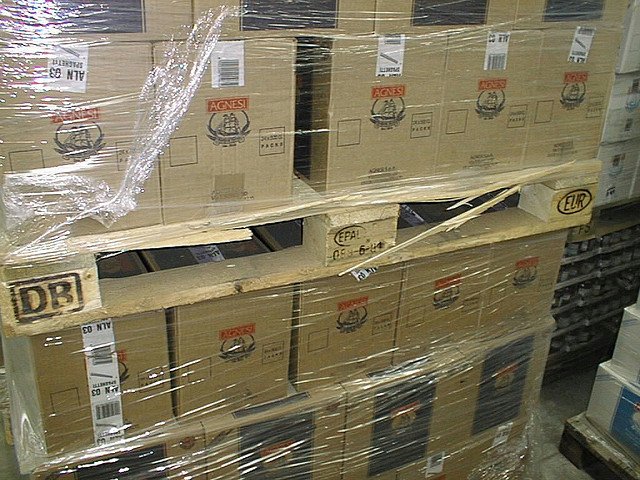 broken or cracked pallet boards
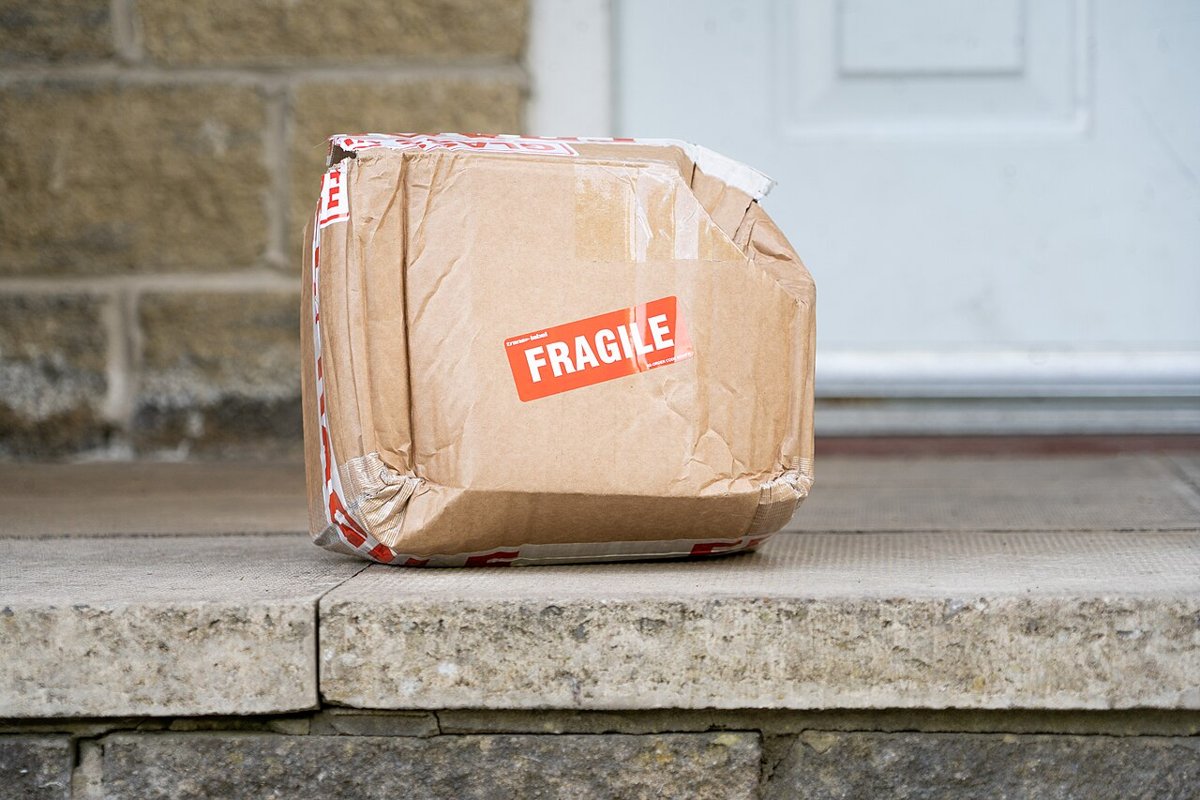 torn or punctured cardboard
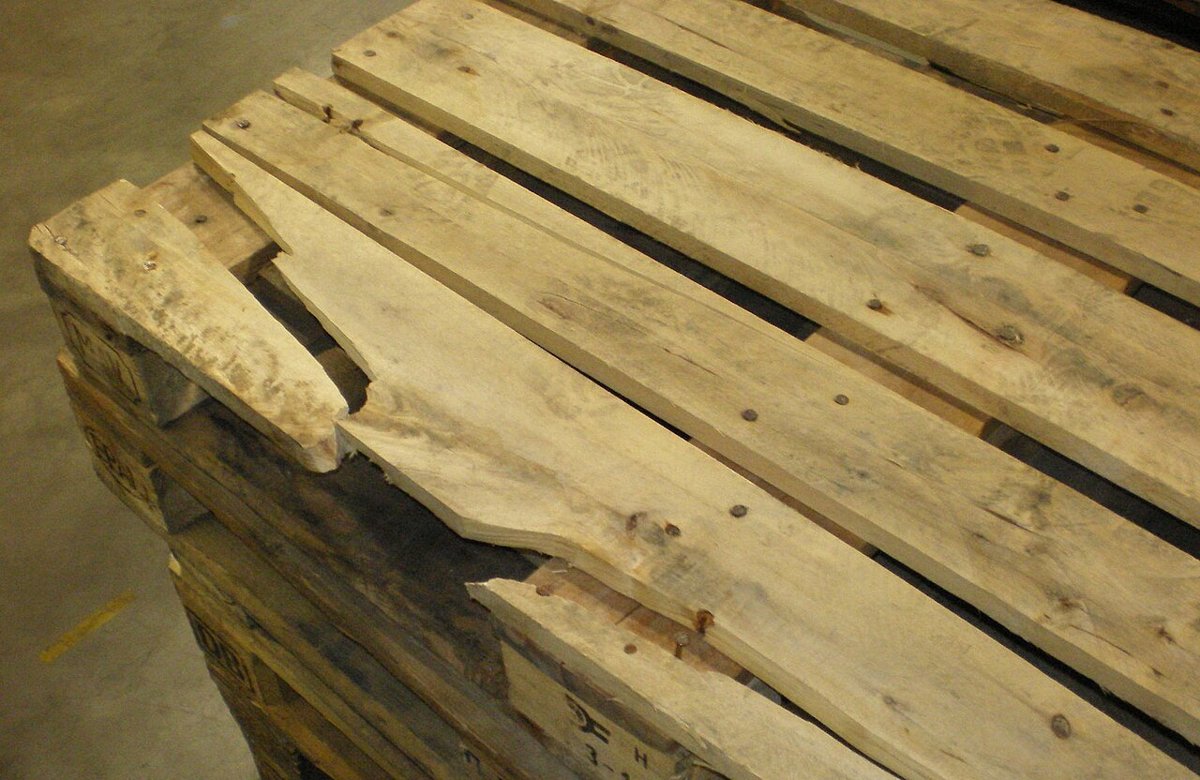 broken or cracked pallet boardsbroken or cracked pallet boards
The images above are real photos, and the system drew the boxes itself. At your site it learns your own damage, so it knows what counts as damage in your operation.
The camera sits where the goods pass anyway. Every pallet gets its own image record with time and door, and damage is linked to the right delivery and sender. Labels and markings are read in the same step.
Third-party warehouses and terminals with many inbound deliveries, and anyone who argues about transport damage.
This is where we try the same technology outside the warehouse. These are prototypes we develop further together with interested partners.
Cameras along the track detect people and objects that don't belong there, such as a tree fallen across the rails. The system warns the train driver in time to brake and can alert traffic control or the emergency services (112) when someone is in danger. A train needs hundreds of metres to stop, and the driver rarely sees that far.
Tree across the track · 70 km/h · created automatically
The camera has only learned what the track normally looks like, not what a tree is, so the same alarm covers rocks, vehicles and people on the track.
The cameras sit on the catenary masts that are already there, and each one sees the track in both directions and the slopes beside it. They learn their own view under different light and weather and compare every image with it. Nothing has to be labelled in advance.
An alarm carries the position on the line, a picture and a time. It goes to the driver and to traffic control, and if a person is in danger it can call 112 straight away. The map shows where. The alarm supports the routines already in place; it does not replace the signalling system.
Tell us what you want to keep an eye on, and we put together the models, cameras and rules for your warehouse.
We are a Swedish company building for European warehouses. You notice it in where your data ends up, which rules we follow and which goods our models recognise.
Your choice. The system can run entirely on your premises, on your own server inside your network, or in data centres inside the EU/EEA. Nothing is sent to third countries.
We track forklifts, pallets and goods. People are detected for safety but never identified. No facial recognition, and faces can be masked at the camera.
We document models, training data and risks the way the EU AI Act requires, and we build nothing the Act prohibits in the workplace.
Our models are trained on EUR pallets, KLT boxes, gitterboxes and roll cages. That is what stands on Swedish warehouse floors.
You need neither new systems nor a big project. We start with the cameras you already have and with what pays off most, and roll out once it has proven itself.
Most IP cameras in a warehouse work. New cameras are only needed where no camera sees what is to be counted or measured.
The system runs on a quiet computer at your site, not in a data centre. The images never have to leave the building.
Three cameras are enough to get going. What works gets rolled out, the rest you leave.
Installation, calibration, fine-tuning on your images and support, in one fixed monthly fee.
Up to 3 cameras
Up to 5 cameras
Up to 10 cameras
More cameras or several sites
| Use | Example camera | Placement |
|---|---|---|
| Counting at the door and dock | Axis M3086-V | Above the door, 3.5–5 m, angled down at the threshold |
| Overview and tracking in metres | Axis M3088-V, wide angle | High, 6–10 m, so the floor is in view |
| Damage photos at receiving | Axis M3088-V, outdoors Axis P3288-LVE | At the door, 3–4 m, needs good lighting |
| Pallet dimensioning | Intel RealSense or Orbbec, cameras that see depth | Straight above the zone, 2.5–3.5 m. For internal checks, not for invoicing |
| Labels and number plates | Axis P3265-LVE, for number plates Axis Q1700-LE | Takes sharp pictures of moving text |
| On-site computer, 3–5 cameras | Small NVIDIA computer | Small and quiet, fits in a network cabinet |
| On-site computer, 10 cameras | Compact computer with an NVIDIA graphics card | Enough for ten cameras and dimensioning |
We recommend Axis or Hanwha for new cameras; existing cameras of other brands usually work, preferably on a separate network. Warnings are advisory, and the dimensioning is not approved for invoicing.
How many doors you have, which cameras are already up and what hurts most. We come back with a proposal for your site.
A six-week pilot at your own site, with goals we sign before we start.
Send ten minutes of footage from one of your cameras. We show what the models see in it, with no installation and no charge.
We connect the cameras and draw the zones together with you on site. The goals for the pilot are written down and signed.
The system runs but does not alert. We collect images from your cameras, fine-tune the model on them and measure how often it is right, until it meets the bar.
Events and alerts go to your systems and your people. You see the results every week.
A written review against the goals we signed. What works gets rolled out; you own your data and can take it with you.
We are two founders and take at most two pilots at a time. Support on weekdays 8–17, with an answer by the next working day at the latest. Warnings from the system support your routines; they are not a safety function that replaces them.
We are two founders, one in planning and optimisation and one in computer vision. You talk directly to the people who build the systems.
Uppsala and Stockholm, Sweden
Not everything fits a ready-made product. We also take on consulting work: an optimisation model for your particular flow, a camera solution for unusual goods, a simulation before a rebuild or a second opinion before a procurement. If the problem involves logistics, planning or images, we would like to hear about it.
What we build can be delivered as a service in an EU cloud or installed entirely on your premises, on your own hardware and inside your own network.
Write to the same address as above with a short description of what you need, and we will come back with a proposal.